El sysadmin que vigila tu infraestructura completa 24/7

Pulse Patrol vigila tu infraestructura como un ingeniero senior que nunca duerme. Empieza gratis con Community. Relay está cuando necesitas Pulse desde cualquier lugar, y Pro aporta análisis de causa raíz y flujos de remediación seguros en vez de más ruido de alertas.

Pulse autohospedado empieza gratis con Community. Relay añade acceso remoto seguro a la interfaz web de Pulse; Pro añade análisis de causa raíz, flujos de remediación seguros e historial de 90 días.
Marcado con estrellas por 5,800+ desarrolladores en GitHub
Autohospedado primero
Privacidad primero
Usa tu propio LLM
Soporte nativo para
Proxmox VE
Docker
Kubernetes
Ceph
ZFS
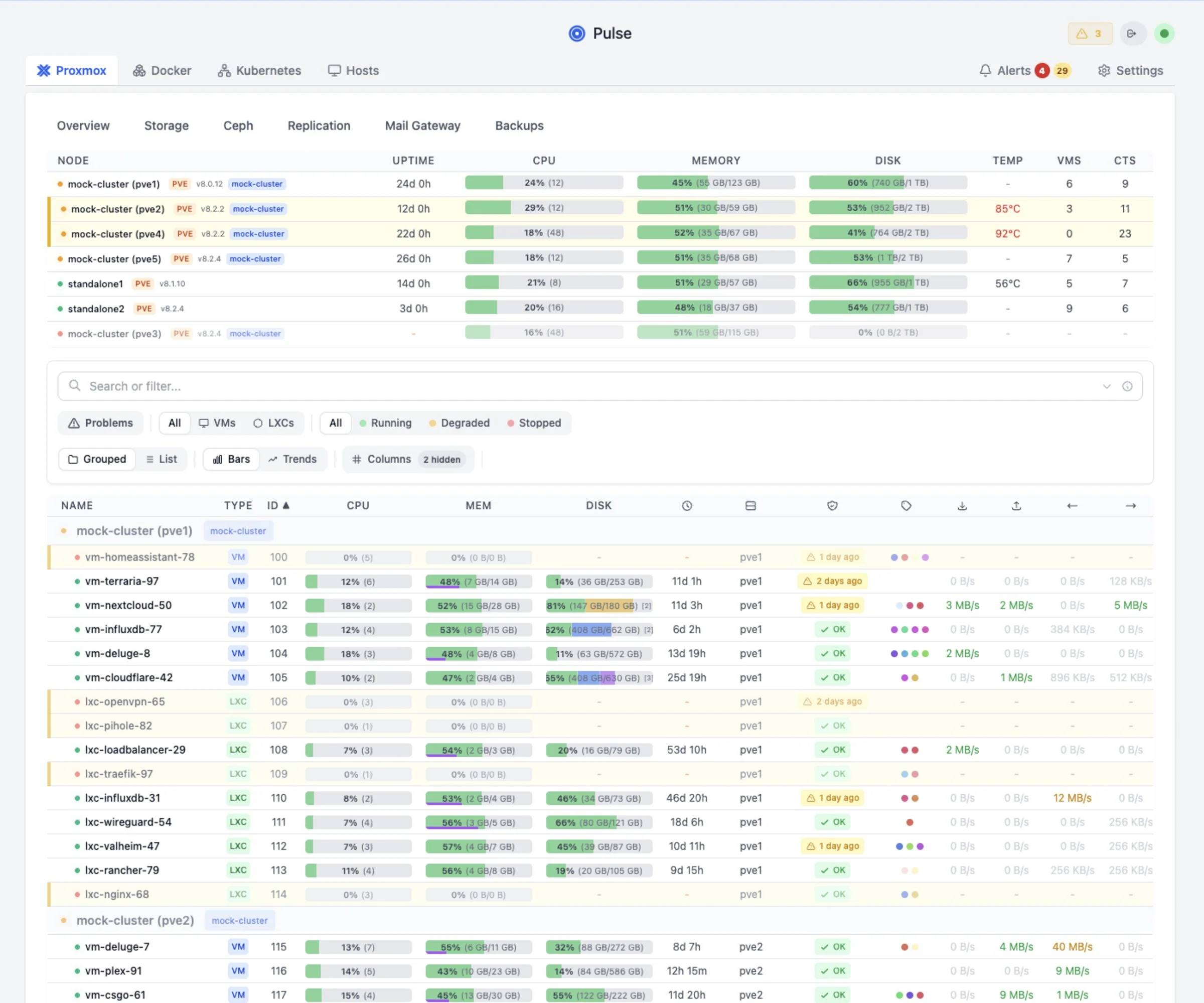
Dashboard de Pulse mostrando la vista general de plataforma v6
Hallazgo de Pulse Patrol · ahora mismo
Advertencia
El trabajo de backup "pbs-daily" está fallando
Las últimas 3 ejecuciones fallaron con "connection refused". PBS en 192.168.1.50 puede no estar accesible.
Opciones de despliegue

Empieza autohospedado hoy

Pulse está disponible hoy como producto autohospedado. Mantenlo en tu propio entorno, empieza gratis y actualiza solo cuando las funciones operativas de pago te resulten útiles.

Ejecútalo tú mismo

Pulse autohospedado

Ejecuta Pulse dentro de tu propio entorno. Empieza con Community. Relay ofrece acceso seguro desde cualquier lugar; Pro ofrece análisis de causa raíz, flujos de remediación seguros e historial.

  1. Instala Pulse en tu propia infraestructura.
  2. Conecta Proxmox, Docker, Kubernetes y servicios relacionados.
  3. Mantén el monitoreo gratis; elige Relay o Pro solo cuando las funciones operativas extra sean útiles.
Previsualiza el flujo

Demo en vivo

Prueba la demo hospedada actual antes de instalar nada. Muestra la forma operativa de Pulse sin pedirte que conectes tus propios sistemas primero.

  1. Abre el dashboard de demo.
  2. Revisa la infraestructura, los hallazgos de Patrol y el flujo de investigación.
  3. Instala Pulse autohospedado cuando el flujo encaje con tu entorno.
Precios

Precios autohospedados

Elige el plan autohospedado que encaja con tu setup.

Pago seguro con Stripe
Licencia disponible justo después del pago
Garantía de devolución de 14 días
Acceso MSP / proveedor

¿Gestionas Pulse en workspaces de clientes?

Los planes autohospedados estándar cubren un entorno Pulse. Pulse MSP da a los proveedores una sola cuenta Pulse para operar muchos clientes, con una runtime Pulse aislada por cliente: dashboards, alertas, webhooks, usuarios, historial de auditoría e informes separados. Hospedado por el proveedor por defecto; hospedado por Pulse bajo solicitud.

Con solicitud

MSP Starter

$149/mo

Hasta 5 workspaces de cliente, hospedado por el proveedor. Solicita la configuración mientras el checkout público de MSP está en preview asistida.

Solicitar MSP Starter
Asistido

MSP Growth / Scale

Growth $249/mo Scale $399/mo

Para 15+ workspaces de cliente: Growth cubre hasta 15, Scale hasta 40. Los despliegues mayores, white-label u hospedados por Pulse siguen siendo asistidos por solicitud.

Solicitar Growth o Scale

Los dashboards se ven bien.
Pero no arreglan cosas.

Tienes gráficas de Grafana y alertas de Zabbix. Pero, ¿realmente las miras? La mayoría de las caídas en homelabs ocurren porque "las alertas hacían demasiado ruido" o "no revisé el dashboard".

Pulse es diferente. It doesn't just graph CPU usage. It analyzes why CPU is high, connects it to that failing backup job, and tells you the root cause in plain English.

Monitoreo tradicional
⚠️ CPU > 90% (Node pve1)
⚠️ IO Delay > 10% (Node pve1)
⚠️ Backup Job failed
...and 20 more emails
Pulse Patrol
Causa raíz identificada
"Backup job stalled causing high IO delay. CPU wait is high. Kill the stuck backup process."
Lo que detecta Pulse Patrol

Problemas reales de clusters reales

No son hipótesis. Son hallazgos reales de homelabs en producción que ejecutan Pulse.

💾
ZFS pool "tank" 94% full

At current growth rate, pool will be full in 3 days. ZFS performance degrades significantly above 80%.

→ Run `zfs list -o space`
🔄
VM 105 restarting loop

6 unexpected reboots in the last 24 hours. Memory usage spikes to 98% before each restart.

→ Check memory allocation
📦
Backup job silent fail

"nightly-backup" last succeeded on Dec 18. VM 102 (postgres) has no recent protection.

→ Check PBS storage
🖥️
Node clock drift

System time is 47s behind cluster. Can cause ceph issues and VM migration failures.

→ Check NTP sync
🐳
Stalled Container

Container "plex" running but failing health checks on port 32400 for > 2 hours.

→ Check app logs
⚙️
Config Drift

Network config differs on node pve3. vmbr0 MTU is 1500 vs 9000 on other nodes.

→ Fix MTU mismatch
★★★★★ Featured Review

"Pulse is by far the best way to monitor my Proxmox hosts in a single dashboard. No overwhelming metrics that nobody cares about. Just what you need."

r/selfhosted community member
Empezar →
# Pulse Patrol runs automatically $[17:35:02] Starting patrol run... [17:35:02] Analyzing 3 nodes, 24 VMs [17:35:04] Scanning logs, metrics... [17:35:07] Patrol complete: 2 warnings, 1 critical
[CRITICAL] ZFS pool at 94% [WARNING] Backup job failed [WARNING] VM 105 memory pressure
Pulse Pro: Pulse Patrol
Hallazgos de Pulse Patrol en el dashboard de Pulse
Por qué esto no es solo otro chatbot

Tu infraestructura, no solo una ventana de chat

When you ask ChatGPT about your server, you have to describe everything manually. Patrol sees your entire infrastructure at once, with historical context no generic LLM can access.

📊 Full Infrastructure State
  • Proxmox nodes, VMs, containers
  • Docker/Podman hosts & containers
  • Kubernetes pods, deployments, services
  • PBS/PMG backup status & jobs
  • Ceph clusters & OSD health
  • ZFS pools & storage usage
📈 Historical Intelligence
  • 24h & 7d trends: rising, stable, or volatile
  • Learned baselines: what's normal for your env
  • Capacity predictions: "full in X days"
  • Anomaly detection: z-score deviations
  • Change tracking: config drift and migrations
  • Incident memory: past investigations
🧠 Operational Memory
  • Your notes: "runs hot for transcoding"
  • Dismissed alerts: won't nag again
  • Past remediations: what fixed it before
  • Resource correlations: cross-host patterns
  • User feedback: learns from your input
  • Suppression rules: expected behavior

This is what makes Patrol catch issues that static alerts miss.

It's not just "CPU > 90%". It's "CPU spiked to 85% but that's normal for this VM during backups, however the backup hasn't completed in 3 hours which is unusual."

Exclusivo de Pro

El problema de las 3 a. m., resuelto

Las alertas tradicionales te despiertan con ruido. Pulse te despierta con respuestas.

Traditional monitoring · 3:14 AM
⚠️ ALERT: CPU > 90%
⚠️ ALERT: Memory > 85%
⚠️ ALERT: IO Wait > 20%
...and 12 more
"Great, everything is on fire. Where do I even start?"
Alert Root-Cause Analysis · 3:14 AM
Root Cause: Runaway backup process
PBS backup job for VM 102 (postgres) is stuck in a write loop, consuming 94% CPU and causing IO saturation. All other alerts are symptoms.
→ One root cause, not 15 alerts
Skip the 20-minute triage. Start fixing immediately.
Pulse uses AI to analyze every alert the moment it fires, so you don't have to correlate logs at 3am.
Exclusivo de Pro

Pulse ayuda a corregir, no solo a reportar

Patrol doesn't just find problems. It can build a safe remediation plan, show the exact command, and run it only under the approval policy you choose.

🤖
Pulse Assistant
Investigating patrol finding
I found a stuck backup process on pve1. The PBS task UPID:pve1:00003A2F has been running for 6+ hours with no progress.
Recommended action: Kill the stuck task to free resources.
PROPOSED FIX
pvesh delete /nodes/pve1/tasks/UPID:pve1:00003A2F
Fix applied successfully
Task terminated. CPU usage returning to normal.
🛡️ Commands require explicit approval. You stay in control.
Agente unificado

Un agente. Todas las plataformas.

Instala una vez y monitorea todo. El agente detecta Docker, Kubernetes y Proxmox automáticamente, sin configuración manual.

🔍
Auto-Detection

Detects Docker, Podman, Kubernetes, and Proxmox automatically

🔄
Auto-Updates

Agent updates itself when new versions are released

📦
Single Binary

One install command. Works on Linux, macOS, and Synology

🛡️
Pulse Commands

Let Pulse run diagnostics and fixes on connected hosts

# Install on any host - Docker, K8s, Proxmox auto-detected $ curl -fsSL http://pulse:7655/install.sh | bash -s -- --token <token>
[install] Detecting platforms... [install] Found: Docker ✓ Kubernetes ✓ Host metrics ✓ [install] Installing pulse-agent to /usr/local/bin/ [install] Creating systemd service... [install] ✓ Agent connected to Pulse
Para equipos

Creado para entornos de producción

¿Usas Pulse para un equipo o empresa? Pro incluye funciones de cumplimiento y colaboración listas para usar.

📋
Audit Logging

Tamper-proof logs with HMAC signing. Stream to your SIEM via webhooks. Configurable retention.

👥
Role-Based Access

Define roles and permissions. Control who can view, modify, or execute commands across your infrastructure.

🔐
SSO Included

OIDC, SAML, and multi-provider SSO are included with Community. Pro is for deeper operator workflows and team controls.

📊
Infrastructure Reports

Generate PDF/CSV reports. Capacity trends, resource usage, patrol history. Share with stakeholders.

Configuración

En marcha en minutos

1

Desplegar Pulse

Docker o LXC. Añade tus credenciales de API de Proxmox.

docker run -d pulse
2

Añade tu clave LLM

OpenAI, Anthropic u Ollama local. Tu elección, tus datos.

Settings → Pulse Assistant → Add Key
3

Pulse Patrol empieza

Escaneo automatizado según tu horario. Los hallazgos aparecen en Dash.

🟢 Watching
Secure checkout by Stripe
14-day money-back guarantee
Works worldwide
Community

Lo que dicen los usuarios

"Pulse is by far the best way to monitor my Proxmox hosts in a single dashboard."

Homelab user

"No overwhelming metrics that nobody cares about. Just CPU, memory, and disk. Simple and easy."

r/selfhosted member

"I wanted to try Pulse and instantly fell in love with it once installed."

Proxmox cluster admin

"The Setup Wizard was easy as can be. Upgrade was super easy, with no issues at all."

Beta tester

"Really clean, easy to look at interface. Love what you've done with this."

Docker host user

"Found this project and was very impressed. Thank you for your efforts and good work."

Multi-node user
Reseñas

Ver Pulse en acción

Reseñas de la comunidad sobre Pulse

FAQ

Preguntas frecuentes

¿Puedo usar mi propio LLM? +
Yes! Pulse supports OpenAI, Anthropic Claude, Google Gemini, and local Ollama. Your data stays on your infrastructure. We never see it.
¿Cuál es la política de reembolso? +
14-day money-back guarantee, no questions asked. If it's not for you, we'll refund you immediately.
¿Relay o Pro cobran por servidor? +
No. One plan covers your Pulse installation. Pulse still counts top-level monitored systems once for product understanding, and child resources like VMs, containers, pods, disks, and backup jobs are included, but self-hosted plans do not charge by monitoring volume.
¿Cómo funcionan Relay y Pro en v6? +
Community keeps monitoring free. Relay gives you secure remote access to your Pulse web UI, Pulse Mobile pairing for handoff, push notifications, and 14-day history. Pro adds root-cause analysis, safe remediation workflows, and 90-day history, with RBAC, audit logging, reporting, and agent profiles included for teams. Existing recurring v5 subscribers keep their current recurring price and continuity terms while the subscription stays active.
¿Los clientes existentes de Pulse Pro perderán algo en v6? +
No. Existing Pulse Pro and legacy Pro+ holders keep their paid runtime access. Pro+ is now continuity-only rather than a public checkout tier, but it keeps the Pro feature set. Current recurring v5 subscribers also keep their current recurring price while the subscription stays active. Self-hosted monitoring remains included across v6 plans, child resources stay included underneath their monitored systems, and lifetime licenses remain honored permanently.
¿Funciona sin conexión / aislado? +
Yes! Pulse runs entirely self-hosted. Use a local LLM like Ollama for fully air-gapped environments. No internet required after setup.
¿Compras para una empresa? +
Stripe Checkout includes its own business purchase option for supported tax IDs and legal business names. If you have already purchased and need corrected invoice details, email [email protected].
¿No recibiste el correo de licencia? +
If your order completed but you cannot find the license email, use the license retrieval page. Enter the email address used at checkout and I will send a verification code so you can reveal your current license key immediately. Also check spam or junk for messages from [email protected].

Deja de cambiar tus noches y fines de semana por uptime.

¿Listo para ejecutar Pulse en producción? Revisar precios autohospedados
Precios autohospedados Probar demo