The sysadmin that watches your entire infrastructure 24/7

Pulse brings Proxmox, Docker, Kubernetes, TrueNAS and vSphere into a single self-hosted workspace, with a page for every platform and alerts that tell you the moment something breaks.

Free and open source, self-hosted, no account required. Paid plans add remote access and hands-on automation when you want them.
Starred by 6,100+ developers on GitHub
Self-hosted first
Privacy-first
Open source

Covered by XDA Developers VirtualizationHowto 45HomeLab
Native support for
Proxmox VE
Docker
Kubernetes
TrueNAS
vSphere
Ceph
ZFS
Pulse dashboard showing the unified platform overview
The workspace

A page for every platform

Proxmox, Docker, Kubernetes, TrueNAS, vSphere and standalone machines each get their own view, in the shape operators already know. Storage and recovery live on the platform pages they belong to.

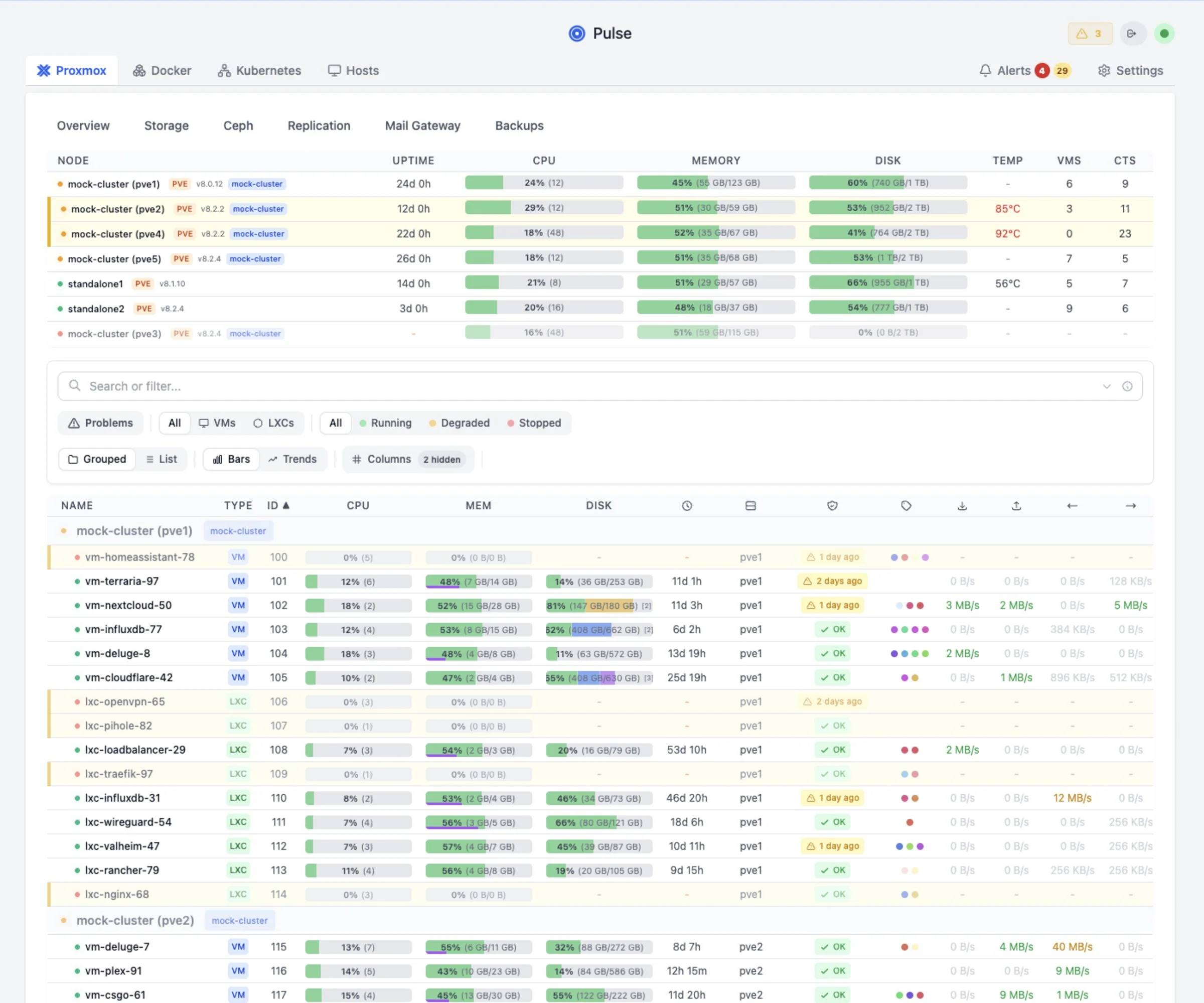
Pulse Proxmox view showing nodes, VMs and containers with CPU, memory, disk and uptime
Nodes, VMs and LXC in one table. Filter, group and sort by anything, or hit / to search.

Alerts that stop flapping

Adaptive, hysteresis-based thresholds instead of a bare number, so a VM sitting on the line doesn't mail you forty times. Delivered to Discord, Slack, Telegram, email and more.

Recovery you can actually check

Backup, snapshot and replication history for PBS, ZFS and TrueNAS, and vSphere, on the platform page it belongs to. The job that quietly stopped running is visible.

History and trends

Persistent metrics with configurable retention, so you can answer whether this is new or whether it has been creeping for a month.

Built to be driven fast

g p for Proxmox, g d for Docker, g a for Alerts, Cmd+K for the command palette.

Coverage

What Pulse connects to

Proxmox is read over the API with no agent at all. Everything else uses one binary that works out what is running on the host by itself.

Proxmox VE, PBS and PMG

  • Nodes, VMs, LXC and OCI containers on 9.1+
  • Backup jobs, datastores and verification from PBS
  • Mail gateway queues and counters from PMG
  • Auto-discovery of nodes on your network

Docker and Podman

  • Container state, health checks and restarts
  • Swarm services and their roles
  • Per-host CPU, memory, disk and uptime
  • Detected automatically by the agent

Kubernetes

  • Cluster nodes and workloads
  • Pod-level resource usage
  • Sits next to your other platforms, not in a silo

TrueNAS and ZFS

  • Pools, datasets and individual disks
  • ZFS snapshots and replication tasks
  • TrueNAS alerts surfaced alongside your own

vSphere

  • Clusters, hosts and virtual machines
  • Snapshot and recovery history
  • Same resource model as everything else

Ceph and standalone hosts

  • Ceph cluster health next to the nodes using it
  • Any Linux, Windows or macOS box as a machine
  • Synology included
Unified agent

Install once, monitor everything

The agent auto-detects Docker, Podman, Kubernetes and Proxmox with no manual configuration, and keeps itself up to date.

Auto-Detection

Detects Docker, Podman, Kubernetes, and Proxmox automatically

Auto-Updates

Agent updates itself when new versions are released

Single Binary

One install command. Works on Linux, macOS, and Synology

Pulse Commands

Let Pulse run diagnostics and fixes on connected hosts

# Install on any host, served from your own Pulse server $ curl -fsSL http://pulse:7655/install.sh | bash -s -- --token <token>
[install] Detecting platforms... [install] Found: Docker ✓ Kubernetes ✓ Host metrics ✓ [install] Installing pulse-agent to /usr/local/bin/ [install] Creating systemd service... [install] ✓ Agent connected to Pulse
Reviews

See Pulse in action

Community reviews of Pulse, and what people say after installing it.

VirtualizationHowto The Free Proxmox Monitoring Dashboard You've Been Waiting For
45HomeLab Is This the Simplest Way to Monitor Proxmox? Meet Pulse!

"I set it up for the first time yesterday and was impressed by the simplicity and ease of setup [...] I was up and monitoring in a few minutes. The fact that you can monitor docker as well is just icing on the cake!"

@Radixb on GitHub

"Setup Wizard - Easy as can be! Love it! Upgrade was super easy no issues at all."

@faustus1005, Pulse 5.0 release candidate testing

"Thank you very much for the quick handling of my ticket and for implementing the requested feature so fast. That kind of responsiveness is rare and highly appreciated. Pulse is an excellent tool"

@prueckls on GitHub

"Your repository is probably the only GitHub I know where Issues are closed this quick."

@hughfr4nc15 on GitHub
In the press

"This is hands-down the best monitoring utility for Proxmox"

Start Free →
Pulse Patrol

The rounds you keep meaning to do

Alerts catch the things you thought to write a rule for. Patrol goes looking for the rest on a schedule: capacity creep, backups that stopped working months ago, drift between nodes. Findings come free with every install, using your own LLM key or a local model.

ZFS pool "tank" 94% full

At current growth rate, pool will be full in 3 days. ZFS performance degrades significantly above 80%.

→ Run `zfs list -o space`
VM 105 restarting loop

6 unexpected reboots in the last 24 hours. Memory usage spikes to 98% before each restart.

→ Check memory allocation
Backup job silent fail

"nightly-backup" last succeeded on Dec 18. VM 102 (postgres) has no recent protection.

→ Check PBS storage
Node clock drift

System time is 47s behind cluster. Can cause ceph issues and VM migration failures.

→ Check NTP sync
Stalled Container

Container "plex" running but failing health checks on port 32400 for > 2 hours.

→ Check app logs
Config Drift

Network config differs on node pve3. vmbr0 MTU is 1500 vs 9000 on other nodes.

→ Fix MTU mismatch
# Pulse Patrol runs automatically $[17:35:02] Starting patrol run... [17:35:02] Analyzing 3 nodes, 24 VMs [17:35:04] Scanning logs, metrics... [17:35:07] Patrol complete: 2 warnings, 1 critical
[CRITICAL] ZFS pool at 94% [WARNING] Backup job failed [WARNING] VM 105 memory pressure

Patrol can also do something about it

On Pro, Patrol investigates each alert the moment it fires, works out which alerts are symptoms of the same root cause, proposes the exact command, and runs it only under the approval policy you choose. Every action is verified and logged.

How Patrol works →
Pricing

Self-hosted Pricing

Choose the self-hosted plan that fits your setup.

Secure checkout by Stripe
License available immediately after payment
14-day money-back guarantee

Not sure which one you need? Compare what each one does

MSP / provider access

Managing Pulse across client workspaces?

Standard self-hosted plans cover one Pulse environment. Pulse MSP gives providers a single Pulse Account to run many clients, with an isolated Pulse runtime per client: separate dashboards, alerts, webhooks, users, audit history, and reports. Provider-hosted by default; Pulse-hosted by request.

Two client workspaces are free for 60 days, with nothing to request, so you can run it for real clients before you buy.

Learn more about Pulse MSP →

Set up personally

MSP Starter

$149/mo or $1,490/yr

Up to 5 client workspaces, provider-hosted. About $30 per client per month, with unlimited monitored systems inside each workspace.

Request MSP Starter
Set up personally

MSP Growth / Scale

Growth $249/mo or $2,490/yr Scale $399/mo or $3,990/yr

For 15+ client workspaces: Growth covers up to 15, Scale up to 40. Larger fleets, white-label, or Pulse-hosted rollouts are sized individually.

Request Growth or Scale
For teams

Built for production environments

Running Pulse for a team or business? Pro includes compliance and collaboration features out of the box.

Audit Logging

Tamper-proof logs with HMAC signing. Stream to your SIEM via webhooks. Configurable retention.

Role-Based Access

Define roles and permissions. Control who can view, modify, or execute commands across your infrastructure.

SSO Included Free

OIDC, SAML, and multi-provider SSO ship free with Community. No SSO paywall. Pro adds team controls such as roles, audit trails, and reports.

Infrastructure Reports

Generate PDF/CSV reports. Capacity trends, resource usage, patrol history. Share with stakeholders.

Setup

Up and running in minutes

1

Deploy Pulse

Docker or LXC. Add your Proxmox API credentials.

docker run -d --name pulse -p 7655:7655 -v pulse_data:/data -e PULSE_DEPLOYMENT_METHOD=docker_run --restart unless-stopped rcourtman/pulse:latest
2

Connect your infrastructure

Proxmox needs API credentials and nothing else. Everything else gets the one-line agent.

Settings → Infrastructure
3

Add an LLM key optional

Only needed for Patrol and the assistant. OpenAI, Anthropic, Gemini or local Ollama. Monitoring works without it.

Settings → Pulse Intelligence

Prefer a Proxmox LXC, or want the signature-verified installer? Both are on GitHub.

Secure checkout by Stripe
14-day money-back guarantee
Works worldwide
FAQ

Common Questions

Can I use my own LLM? +
Yes! Pulse supports OpenAI, Anthropic Claude, Google Gemini, and local Ollama. Your data stays on your infrastructure. We never see it.
What's the refund policy? +
14-day money-back guarantee, no questions asked. If it's not for you, we'll refund you immediately. MSP plans get 30 days, because a provider deployment takes longer to stand up and evaluate.
Do Relay or Pro charge by server? +
No. Community, Relay, and Pro each cover one owner-operated Pulse environment with unlimited monitored systems. Pulse still counts top-level monitored systems once for product understanding, and child resources like VMs, containers, pods, disks, and backup jobs are included, but self-hosted plans do not charge by monitoring volume. Relay and Pro include three activation slots for a primary deployment, migration, and recovery, not three unrelated environments. Operating separate client environments requires an MSP plan.
What's the difference between Community, Relay, and Pro? +
Community watches your infrastructure locally and includes Patrol findings with your own LLM key. Relay adds secure access, so you can reach the Pulse web UI from anywhere, pair Pulse Mobile, and get push notifications, with 14-day history. Pro puts Patrol to work. It investigates issues, applies safe fixes in the mode you choose (Ask first, Safe auto-fix, or Autopilot), and verifies the result, with 90-day history. Pro includes Relay connectivity plus RBAC, audit logging, reporting, and agent profiles for teams.
I already run Tailscale. Do I need Relay? +
For reaching the web UI, probably not. If you're happy running a VPN or a tunnel you already have a way in, and Community stays free whether you use one or not. Relay exists for the parts a VPN doesn't cover. It's how Pulse Mobile pairs with your server, and it's what delivers push notifications when something breaks, so you find out without opening anything first. It also means no client on every device you want to check Pulse from, and nothing on your network exposed. If none of that is worth $39 a year to you, stay on Community. It isn't a crippled tier.
Can I change or cancel a Relay or Pro subscription myself? +
Yes. The Manage Pulse page shows an exact quote before changing plan or billing cycle. Relay to Pro and monthly to annual changes apply after Stripe confirms the prorated payment. Pro to Relay and annual to monthly changes take effect at renewal. You can cancel or restore renewal and reverse a scheduled change before it takes effect. Canceling keeps paid features through the paid-through date, followed by a seven-day recovery-only window. Payment failures use a separate seven-day functional grace period.
What happens to my existing Pulse license or subscription? +
Existing Pulse Pro and legacy Pro+ holders keep their paid runtime access. Pro+ is now continuity-only rather than a public checkout tier, but it keeps the Pro feature set. Existing recurring subscribers keep their current recurring price while the subscription stays active. Child resources remain included underneath monitored systems, and lifetime licenses remain honored permanently.
Does it work offline / air-gapped? +
Yes! Pulse runs entirely self-hosted. Use a local LLM like Ollama for fully air-gapped environments. No internet required after setup.
Buying for a business? +
Stripe Checkout includes its own business purchase option for supported tax IDs and legal business names. If you have already purchased and need corrected invoice details, email [email protected].
Didn't receive your license email? +
If your order completed but you cannot find the license email, use the license retrieval page. Enter the email address used at checkout and I will send a verification code so you can reveal your current license key immediately. Also check spam or junk for messages from [email protected].

Stop trading your evenings and weekends for uptime.

Ready to run Pulse in production? Review self-hosted pricing
Self-hosted Pricing Try Demo