Der Sysadmin, der deine gesamte Infrastruktur rund um die Uhr überwacht

Pulse Patrol überwacht deine Infrastruktur wie ein erfahrener Engineer, der niemals schläft. Starte kostenlos mit Community. Relay ist da, wenn du von überall auf Pulse zugreifen musst, und Pro liefert Ursachenanalyse und sichere Remediation-Workflows statt noch mehr Alarmrauschen.

Self-hosted Pulse startet kostenlos mit Community. Relay ergänzt sicheren Fernzugriff auf deine Pulse-Weboberfläche; Pro ergänzt Ursachenanalyse, sichere Remediation-Workflows und 90 Tage Verlauf.
Mit Sternen markiert von 5,800+ Entwicklern auf GitHub
Self-hosted zuerst
Datenschutz zuerst
Eigenes LLM verwenden
Native Unterstützung für
Proxmox VE
Docker
Kubernetes
Ceph
ZFS
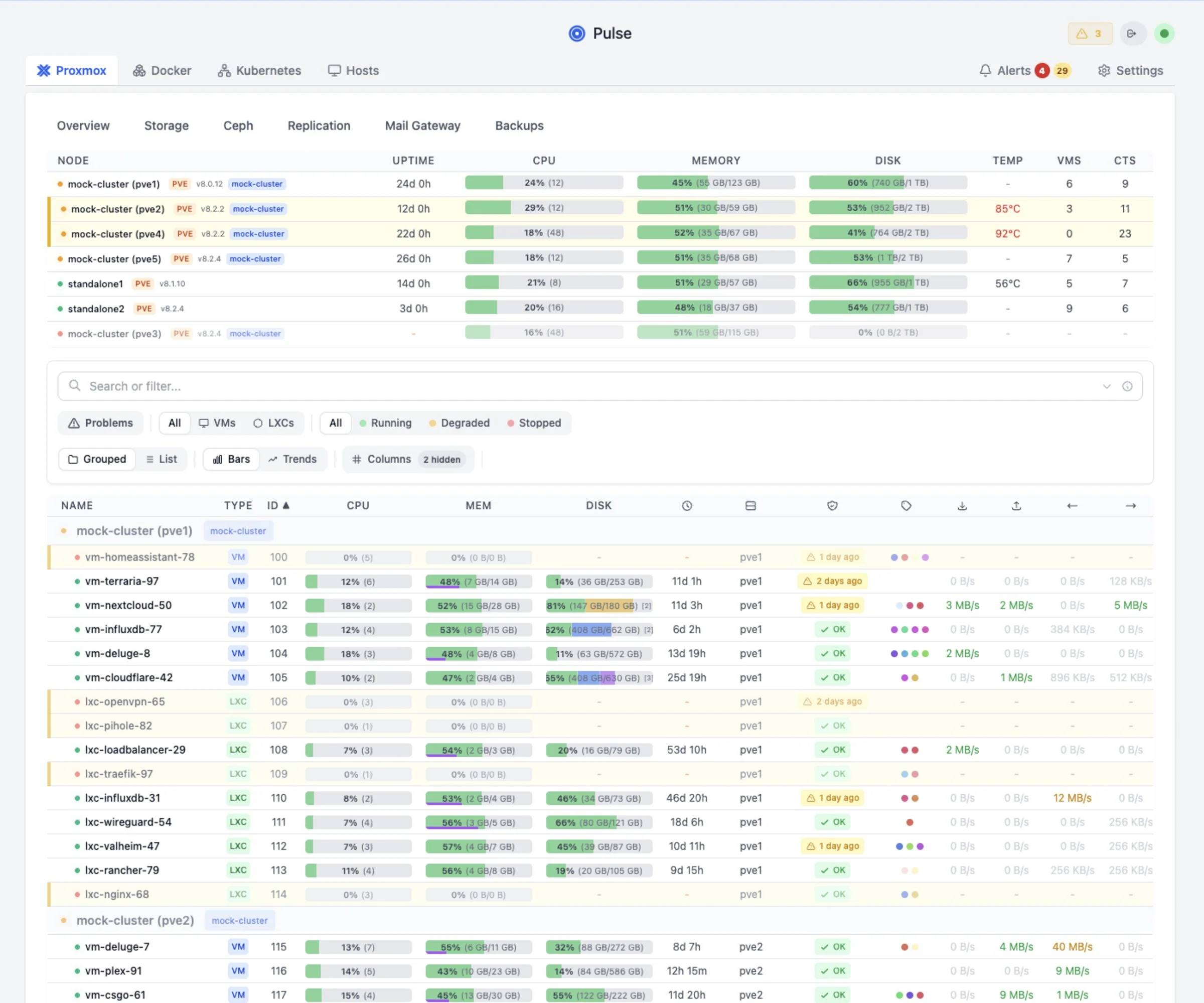
Pulse-Dashboard mit der v6-Plattformübersicht
Pulse-Patrol-Fund · gerade eben
Warnung
Backup-Job "pbs-daily" schlägt fehl
Die letzten 3 Läufe sind mit "connection refused" fehlgeschlagen. PBS unter 192.168.1.50 ist möglicherweise nicht erreichbar.
Bereitstellung

Heute self-hosted starten

Pulse ist heute als self-hosted Produkt verfügbar. Behalte es in deiner eigenen Umgebung, starte kostenlos und upgrade nur, wenn die bezahlten Betriebsfunktionen nützlich sind.

Selbst betreiben

Self-hosted Pulse

Betreibe Pulse in deiner eigenen Umgebung. Starte mit Community. Relay bietet sicheren Zugriff von überall; Pro bietet Ursachenanalyse, sichere Remediation-Workflows und Verlauf.

  1. Installiere Pulse auf deiner eigenen Infrastruktur.
  2. Verbinde Proxmox, Docker, Kubernetes und zugehörige Dienste.
  3. Monitoring bleibt kostenlos; wähle Relay oder Pro erst, wenn die zusätzlichen Betriebsfunktionen nützlich sind.
Workflow testen

Live-Demo

Teste die aktuelle gehostete Demo, bevor du etwas installierst. Sie zeigt die operative Arbeitsweise von Pulse, ohne dass du zuerst eigene Systeme verbinden musst.

  1. Öffne das Demo-Dashboard.
  2. Prüfe Infrastruktur, Patrol-Funde und Investigationsablauf.
  3. Installiere self-hosted Pulse, wenn der Workflow zu deiner Umgebung passt.
Preise

Self-hosted-Preise

Wähle den self-hosted Plan, der zu deinem Setup passt.

Sicherer Checkout über Stripe
Lizenz direkt nach der Zahlung verfügbar
14 Tage Geld-zurück-Garantie
MSP- / Provider-Zugang

Verwaltest du Pulse über Kunden-Workspaces hinweg?

Standard-Self-hosted-Pläne decken eine Pulse-Umgebung ab. Pulse MSP gibt Providern ein einzelnes Pulse-Konto für viele Kunden, mit isolierter Pulse-Runtime pro Kunde: getrennte Dashboards, Alerts, Webhooks, Nutzer, Audit-Verlauf und Reports. Standardmäßig provider-gehostet; Pulse-gehostet auf Anfrage.

Mit Anfrage

MSP Starter

$149/mo

Bis zu 5 Kunden-Workspaces, provider-gehostet. Fordere die Einrichtung an, solange der öffentliche MSP-Checkout im unterstützten Preview ist.

MSP Starter anfragen
Unterstützt

MSP Growth / Scale

Growth $249/mo Scale $399/mo

Für 15+ Kunden-Workspaces: Growth deckt bis zu 15 ab, Scale bis zu 40. Größere, White-Label- oder Pulse-gehostete Rollouts bleiben anfragebasiert.

Growth oder Scale anfragen

Dashboards sehen gut aus.
Aber sie beheben nichts.

Du hast Grafana-Grafen und Zabbix-Alerts. Aber schaust du wirklich hinein? Die meisten Homelab-Ausfälle passieren, weil "Alerts zu laut waren" oder "ich das Dashboard nicht geprüft habe".

Pulse ist anders. It doesn't just graph CPU usage. It analyzes why CPU is high, connects it to that failing backup job, and tells you the root cause in plain English.

Klassisches Monitoring
⚠️ CPU > 90% (Node pve1)
⚠️ IO Delay > 10% (Node pve1)
⚠️ Backup Job failed
...and 20 more emails
Pulse Patrol
Ursache erkannt
"Backup job stalled causing high IO delay. CPU wait is high. Kill the stuck backup process."
Was Pulse Patrol erkennt

Echte Probleme aus echten Clustern

Das sind keine hypothetischen Beispiele. Das sind echte Funde aus produktiven Homelabs mit Pulse.

💾
ZFS pool "tank" 94% full

At current growth rate, pool will be full in 3 days. ZFS performance degrades significantly above 80%.

→ Run `zfs list -o space`
🔄
VM 105 restarting loop

6 unexpected reboots in the last 24 hours. Memory usage spikes to 98% before each restart.

→ Check memory allocation
📦
Backup job silent fail

"nightly-backup" last succeeded on Dec 18. VM 102 (postgres) has no recent protection.

→ Check PBS storage
🖥️
Node clock drift

System time is 47s behind cluster. Can cause ceph issues and VM migration failures.

→ Check NTP sync
🐳
Stalled Container

Container "plex" running but failing health checks on port 32400 for > 2 hours.

→ Check app logs
⚙️
Config Drift

Network config differs on node pve3. vmbr0 MTU is 1500 vs 9000 on other nodes.

→ Fix MTU mismatch
★★★★★ Featured Review

"Pulse is by far the best way to monitor my Proxmox hosts in a single dashboard. No overwhelming metrics that nobody cares about. Just what you need."

r/selfhosted community member
Loslegen →
# Pulse Patrol runs automatically $[17:35:02] Starting patrol run... [17:35:02] Analyzing 3 nodes, 24 VMs [17:35:04] Scanning logs, metrics... [17:35:07] Patrol complete: 2 warnings, 1 critical
[CRITICAL] ZFS pool at 94% [WARNING] Backup job failed [WARNING] VM 105 memory pressure
Pulse Pro: Pulse Patrol
Pulse-Patrol-Funde im Pulse-Dashboard
Warum das nicht nur ein weiterer Chatbot ist

Deine Infrastruktur, nicht nur ein Chatfenster

When you ask ChatGPT about your server, you have to describe everything manually. Patrol sees your entire infrastructure at once, with historical context no generic LLM can access.

📊 Full Infrastructure State
  • Proxmox nodes, VMs, containers
  • Docker/Podman hosts & containers
  • Kubernetes pods, deployments, services
  • PBS/PMG backup status & jobs
  • Ceph clusters & OSD health
  • ZFS pools & storage usage
📈 Historical Intelligence
  • 24h & 7d trends: rising, stable, or volatile
  • Learned baselines: what's normal for your env
  • Capacity predictions: "full in X days"
  • Anomaly detection: z-score deviations
  • Change tracking: config drift and migrations
  • Incident memory: past investigations
🧠 Operational Memory
  • Your notes: "runs hot for transcoding"
  • Dismissed alerts: won't nag again
  • Past remediations: what fixed it before
  • Resource correlations: cross-host patterns
  • User feedback: learns from your input
  • Suppression rules: expected behavior

This is what makes Patrol catch issues that static alerts miss.

It's not just "CPU > 90%". It's "CPU spiked to 85% but that's normal for this VM during backups, however the backup hasn't completed in 3 hours which is unusual."

Nur in Pro

Das 3-Uhr-Problem, gelöst

Klassische Alerts wecken dich mit Lärm. Pulse weckt dich mit Antworten.

Traditional monitoring · 3:14 AM
⚠️ ALERT: CPU > 90%
⚠️ ALERT: Memory > 85%
⚠️ ALERT: IO Wait > 20%
...and 12 more
"Great, everything is on fire. Where do I even start?"
Alert Root-Cause Analysis · 3:14 AM
Root Cause: Runaway backup process
PBS backup job for VM 102 (postgres) is stuck in a write loop, consuming 94% CPU and causing IO saturation. All other alerts are symptoms.
→ One root cause, not 15 alerts
Skip the 20-minute triage. Start fixing immediately.
Pulse uses AI to analyze every alert the moment it fires, so you don't have to correlate logs at 3am.
Nur in Pro

Pulse hilft beim Beheben, nicht nur beim Melden

Patrol doesn't just find problems. It can build a safe remediation plan, show the exact command, and run it only under the approval policy you choose.

🤖
Pulse Assistant
Investigating patrol finding
I found a stuck backup process on pve1. The PBS task UPID:pve1:00003A2F has been running for 6+ hours with no progress.
Recommended action: Kill the stuck task to free resources.
PROPOSED FIX
pvesh delete /nodes/pve1/tasks/UPID:pve1:00003A2F
Fix applied successfully
Task terminated. CPU usage returning to normal.
🛡️ Commands require explicit approval. You stay in control.
Einheitlicher Agent

Ein Agent. Jede Plattform.

Einmal installieren, alles überwachen. Der Agent erkennt Docker, Kubernetes und Proxmox automatisch, ohne manuelle Konfiguration.

🔍
Auto-Detection

Detects Docker, Podman, Kubernetes, and Proxmox automatically

🔄
Auto-Updates

Agent updates itself when new versions are released

📦
Single Binary

One install command. Works on Linux, macOS, and Synology

🛡️
Pulse Commands

Let Pulse run diagnostics and fixes on connected hosts

# Install on any host - Docker, K8s, Proxmox auto-detected $ curl -fsSL http://pulse:7655/install.sh | bash -s -- --token <token>
[install] Detecting platforms... [install] Found: Docker ✓ Kubernetes ✓ Host metrics ✓ [install] Installing pulse-agent to /usr/local/bin/ [install] Creating systemd service... [install] ✓ Agent connected to Pulse
Für Teams

Für Produktionsumgebungen gebaut

Betreibst du Pulse für ein Team oder Unternehmen? Pro enthält Compliance- und Kollaborationsfunktionen direkt ab Werk.

📋
Audit Logging

Tamper-proof logs with HMAC signing. Stream to your SIEM via webhooks. Configurable retention.

👥
Role-Based Access

Define roles and permissions. Control who can view, modify, or execute commands across your infrastructure.

🔐
SSO Included

OIDC, SAML, and multi-provider SSO are included with Community. Pro is for deeper operator workflows and team controls.

📊
Infrastructure Reports

Generate PDF/CSV reports. Capacity trends, resource usage, patrol history. Share with stakeholders.

Einrichtung

In Minuten einsatzbereit

1

Pulse bereitstellen

Docker oder LXC. Füge deine Proxmox-API-Zugangsdaten hinzu.

docker run -d pulse
2

LLM-Schlüssel hinzufügen

OpenAI, Anthropic oder lokales Ollama. Deine Wahl, deine Daten.

Settings → Pulse Assistant → Add Key
3

Pulse Patrol startet

Automatisierte Scans nach deinem Zeitplan. Funde erscheinen im Dashboard.

🟢 Watching
Secure checkout by Stripe
14-day money-back guarantee
Works worldwide
Community

Was Nutzer sagen

"Pulse is by far the best way to monitor my Proxmox hosts in a single dashboard."

Homelab user

"No overwhelming metrics that nobody cares about. Just CPU, memory, and disk. Simple and easy."

r/selfhosted member

"I wanted to try Pulse and instantly fell in love with it once installed."

Proxmox cluster admin

"The Setup Wizard was easy as can be. Upgrade was super easy, with no issues at all."

Beta tester

"Really clean, easy to look at interface. Love what you've done with this."

Docker host user

"Found this project and was very impressed. Thank you for your efforts and good work."

Multi-node user
Reviews

Pulse in Aktion sehen

Community-Reviews zu Pulse

FAQ

Häufige Fragen

Kann ich mein eigenes LLM verwenden? +
Yes! Pulse supports OpenAI, Anthropic Claude, Google Gemini, and local Ollama. Your data stays on your infrastructure. We never see it.
Wie funktioniert die Rückerstattung? +
14-day money-back guarantee, no questions asked. If it's not for you, we'll refund you immediately.
Rechnen Relay oder Pro pro Server ab? +
No. One plan covers your Pulse installation. Pulse still counts top-level monitored systems once for product understanding, and child resources like VMs, containers, pods, disks, and backup jobs are included, but self-hosted plans do not charge by monitoring volume.
Wie funktionieren Relay und Pro in v6? +
Community keeps monitoring free. Relay gives you secure remote access to your Pulse web UI, Pulse Mobile pairing for handoff, push notifications, and 14-day history. Pro adds root-cause analysis, safe remediation workflows, and 90-day history, with RBAC, audit logging, reporting, and agent profiles included for teams. Existing recurring v5 subscribers keep their current recurring price and continuity terms while the subscription stays active.
Verlieren bestehende Pulse-Pro-Kunden in v6 etwas? +
No. Existing Pulse Pro and legacy Pro+ holders keep their paid runtime access. Pro+ is now continuity-only rather than a public checkout tier, but it keeps the Pro feature set. Current recurring v5 subscribers also keep their current recurring price while the subscription stays active. Self-hosted monitoring remains included across v6 plans, child resources stay included underneath their monitored systems, and lifetime licenses remain honored permanently.
Funktioniert es offline / air-gapped? +
Yes! Pulse runs entirely self-hosted. Use a local LLM like Ollama for fully air-gapped environments. No internet required after setup.
Kaufst du für ein Unternehmen? +
Stripe Checkout includes its own business purchase option for supported tax IDs and legal business names. If you have already purchased and need corrected invoice details, email [email protected].
Lizenz-E-Mail nicht erhalten? +
If your order completed but you cannot find the license email, use the license retrieval page. Enter the email address used at checkout and I will send a verification code so you can reveal your current license key immediately. Also check spam or junk for messages from [email protected].

Tausche nicht länger deine Abende und Wochenenden gegen Uptime ein.

Bereit, Pulse in Produktion zu betreiben? Self-hosted-Preise prüfen
Self-hosted-Preise Demo öffnen